 FlorianG
FlorianG Blog
-
Windows Server 2025 - Fixing "Online – Error Retrieving File" in Server Manager
Overviews
In Windows Server 2025, when managing remote systems through the Server Manager, you may encounter the following error message:

Online – Error Retrieving File
This error often occurs when the Windows Remote Management (WinRM) service on the target system exceeds certain request sizes or when the default configuration is too restrictive. The result is that the Server Manager cannot retrieve complete system data.
Cause
The Server Manager uses the WinRM protocol (Windows Remote Management) to communicate with remote systems.
By default, the WinRM stack defines a maximum packet size (MaxEnvelopeSizekb) of 500 KB. For systems with many installed roles, features, or extensive WMI responses, this value may be too low – the Server Manager then aborts the retrieval with the mentioned error.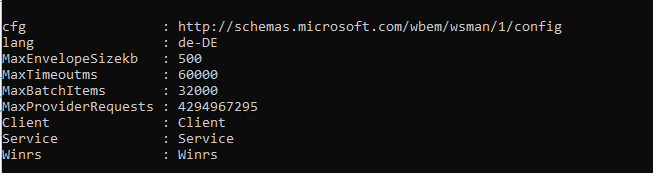
Solution
The error can be resolved by increasing the allowed envelope size on the target system.
This is done using the following PowerShell command, which must be run with administrative privileges:Set-WSManInstance -ResourceURI winrm/config -ValueSet @{MaxEnvelopeSizekb = "8192"}